
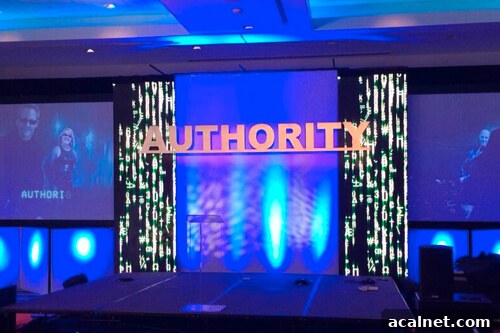
Photo by @kranderson
I just returned from Copyblogger’s first Authority Intensive conference in 2014. It was an energizing event — I left with practical ideas for my website and business, and met a number of new colleagues.
Two things made this the best conference I’ve attended:
- Thoughtful curation of talks by Brian Clark. The sessions complemented one another without repeating material. They followed a clear progression that felt like a concise course on succeeding online.
- Diverse, engaged audience. Attendees came from many industries and business sizes: people from large corporations, successful independent bloggers, and professionals such as lawyers exploring content marketing. At roughly 400 people, the event was large enough for varied conversations but still intimate enough to connect in hallways and at social events.
If you missed this year, consider signing up for Authority Intensive the next time it’s offered — it’s likely to sell out fast.
I was honored when Brian Clark invited me to speak. I followed Seth Godin on stage, which made me quite nervous, but the response was positive and the preparation paid off.
You can view the slides for my talk. Because the slides are mostly screenshots, I’ve written this post to walk through the presentation in more detail so it’s useful to a wider audience.
My talk was aimed at business owners rather than developers. The goal was to give a practical understanding of core web technologies so that when you purchase a theme or hire a developer, you know what to ask and can verify that solutions actually work.
Web Design Buzzwords: Here’s How They Translate Into Dollars
I’m Bill Erickson, a WordPress engineer. I’ve been building websites for businesses and universities for about ten years, and I’ve used WordPress for eight of those years.
Ten years ago the web was simpler: many businesses used static HTML sites and design resembled print. Over time companies needed sites they could manage, and WordPress evolved into a mature content management system. Change hasn’t slowed since — several important technologies have emerged. Below I review three essential elements every modern website should include: Responsive Design, HTML5, and Schema.
Responsive Design
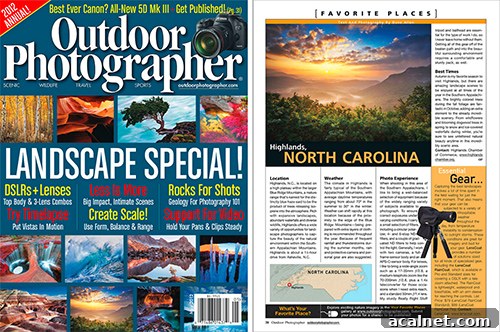
Traditional print design assumes a fixed canvas that looks the same to everyone. Many web designers initially applied the same mindset to websites, designing for a single device or screen size.
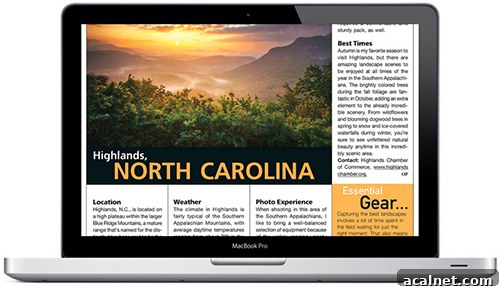
Sites built for a single large screen often perform poorly on tablets and phones: text and images become tiny, navigation designed for a mouse doesn’t translate to touch, and layouts can break.
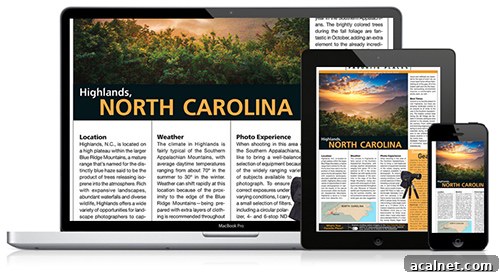
Responsive design is device-agnostic: it ensures content is accessible and attractive on all screen sizes. A responsive site adapts to current devices and helps future-proof your web presence so it works on new devices without a complete redesign.
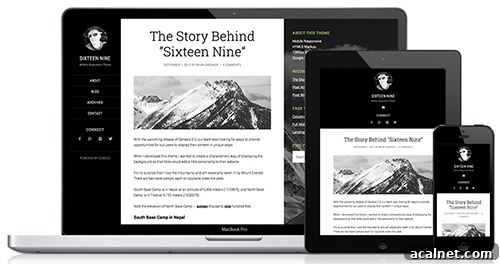
Benefits of responsive design:
- Future-proofing: the same site adapts to new devices and resolutions.
- Canonical URLs: a single URL serves all users, avoiding mobile redirects that can break shared links.
- Cost effectiveness: building one responsive site costs less than developing and maintaining separate desktop and mobile versions or apps.
Responsive Design Techniques
Here are common techniques developers use to implement responsive sites:
- Percentage widths: Replace fixed pixel widths with percentages so elements scale proportionally across screen sizes.
- CSS media queries: Apply styles for specific browser widths. For example, switch a multi-column layout to stacked full-width sections below a given breakpoint, or swap the desktop menu for a touch-friendly menu on small screens.
- High-resolution image handling: Detect device pixel density and serve higher-resolution images (for logos and important graphics) so visuals remain crisp on Retina and other high-DPI displays.
- Browser or device detection: Use server-side checks or simple WordPress helpers like wp_is_mobile() to disable heavy elements (such as large homepage carousels) on mobile devices or replace them with lighter alternatives to improve performance.
One common project pitfall is leaving responsive design until development. Designers must plan for responsive behaviors from the start. When hiring a designer and developer, test portfolio sites on phones and tablets, ask how elements will adapt, and ensure ongoing communication between designer and developer through final implementation. Some designers provide desktop, tablet, and mobile mockups or browser-based prototypes; others use detailed wireframes — the key is clear consideration and documentation of responsive behavior.
HTML5
If a website were a house, HTML would be the structure and CSS the paint. HTML defines the content and its meaning. HTML5 is the modern version of HTML, evolved since HTML4 (released in 1997) to better reflect today’s web.
HTML5 is evolutionary: it offers new tools that help both browsers and search engines understand and interact with your site more effectively.
Semantic HTML Tags
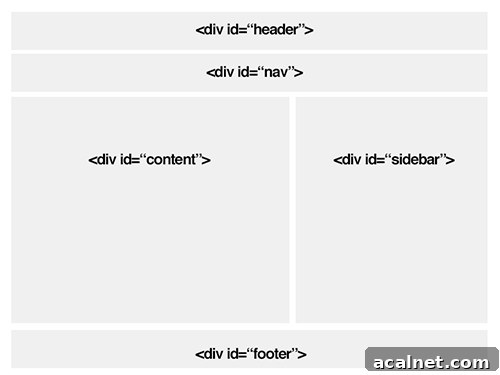
Before HTML5, many sites relied heavily on generic
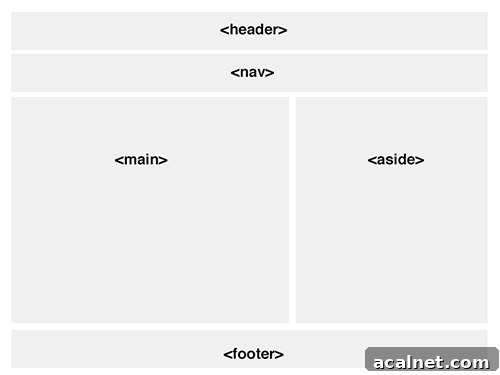
HTML5 introduces semantic tags (header, nav, main, article, aside, footer) that make a page’s structure explicit. This helps browsers render content appropriately and gives search engines clearer signals about what parts of a page are important.
Media and Form Enhancements
HTML5 adds native
Form inputs gained useful enhancements for better mobile usability: input types like “tel” and “email” trigger device-optimized keyboards, placeholder attributes provide built-in hints, and required fields can be validated by the browser. These features reduce the need for custom JavaScript and lead to more consistent experiences across devices.
Schema
Responsive design and HTML5 improve user experience and structure. Schema (structured data or microdata) goes further by providing explicit context about your content to search engines and other services.
Schema.org defines a standard vocabulary recognized by major search engines. Adding Schema markup to your content tells search engines whether a section is a product, a review, an event, a recipe, or other specific content types, and provides attributes like ratings, cook time, location, or dates.
Schema can enhance search result listings. For example, review ratings can appear as stars, events can show dates and locations, and product or local business information can appear in Knowledge Graph panels. These enhanced listings stand out and can increase click-through rates.
Beyond search results, other services use structured data. Pinterest, for instance, reads product and recipe schema to enrich pins. As more platforms rely on structured data, Schema makes it easier for external services to understand and present your content accurately.
Common Schema use cases:
- Product and review markup to surface ratings in search results.
- Breadcrumb markup so search listings can include navigational links to your site sections.
- Event markup to display upcoming events with time and location in search listings.
- Recipe markup to show images, ratings, and cook time directly in results.
Schema Resources
- Genesis Framework and Microdata Manager
- Yoast plugins: WordPress SEO, Local SEO, Video SEO
- Schema Creator Plugin
- Schema.org
- Google Structured Data Testing Tool
- Google Rich Snippet Types documentation
Summary
Responsive Design, HTML5, and Schema are three essential technologies for modern websites. Together they future-proof your site, improve the user experience across devices, and give search engines the information they need to deliver targeted traffic.
Responsive design ensures one site works well on all devices by adapting layout, navigation, and image assets. HTML5 provides clearer semantic structure and better media and form support. Schema adds structured context so search engines and services can present your content more effectively.
When building or updating a website, make sure these elements are considered from the start so your investment continues to pay off as technology evolves.
Thank you